
Setting up a Kubernetes Cluster the Hard Way with kubeadm (GitOps Series, Part 2)
Published:
Setting up a Kubernetes Cluster the Hard Way with kubeadm (GitOps Series, Part 2)
← Part 1: Setting up the Kubernetes cluster
In the previous post of this series, we set up a Kubernetes cluster from scratch using kubeadm. Now that we have a functional cluster, it’s time to deploy some essential infrastructure applications and tools to manage our cluster effectively.
Hence this post will now describe how to:
- Setting up core infrastructure components and tools
- Adding taints and labels to the nodes
- Core
- Calico as CNI plugin via tigera-operator
- MetalLB as load balancer
- Metric-server for resource metrics
- Tools
- Enabling persistent storage via NFS and SMB provisioners
- External Secrets Operator for Kubernetes secret management
- Vault for secure secrets storage
- ArgoCD for GitOps continuous delivery
- Cert-manager for automated TLS certificate management
- Wildcard TLS certificate provisioning
- Nginx Ingress Controller with VirtualServer CRDs
- Kyverno for policy-based secret distribution
- Pi-hole for DNS management and ad-blocking
- External-DNS for automatic DNS record management
During this setup we will run into the chicken-and-egg problem on a couple of occasions:
- My applications rely on secrets, but I want to manage my secrets in Git as well. → This will be solved by deploying Vault and the External Secrets Operator.
- I want to use ArgoCD to manage my k8s manifests in a GitOps fashion, but I need to deploy ArgoCD first. → This will be solved by deploying ArgoCD manually first, then using it to manage itself and the rest of the applications.
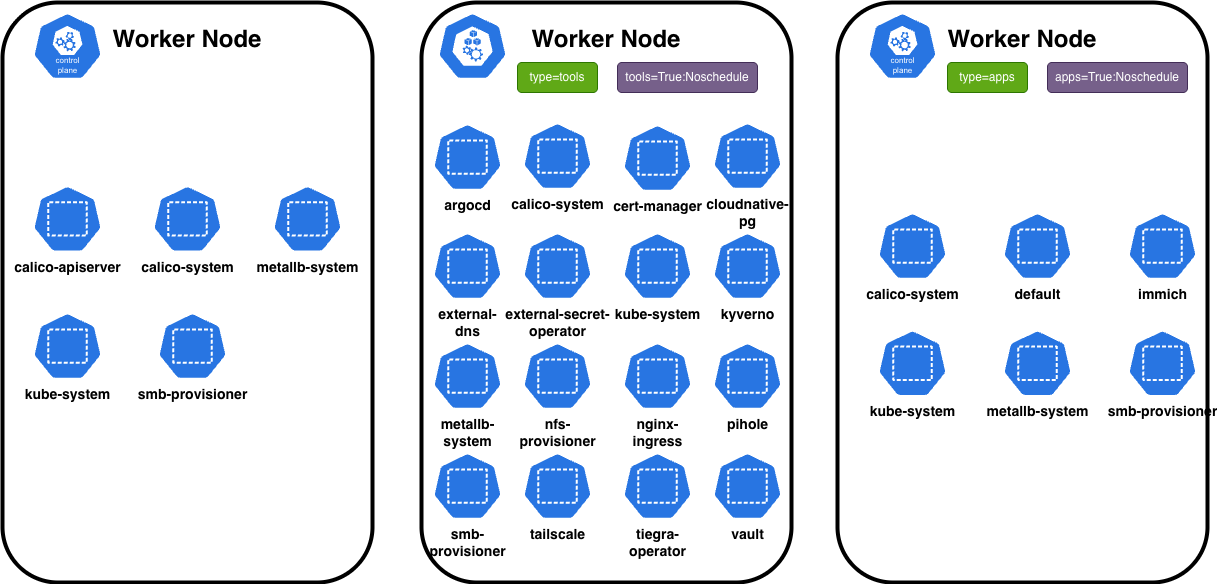
The picture above illustrates the overall architecture of my homelab cluster. It consists of one control-plane (CP) node and two worker (WP) nodes. The core infrastructure components are deployed on the control-plane node, while the tools and applications are distributed across the worker nodes based on their designated types and the corresponding taints and labels on the CP.
Prerequisites
- Completed Part 1 of this series
- A Git repository for storing your configurations
You can find my complete configurations in my homelab repository. I pin chart versions for reproducibility - feel free to bump them later.
Adding Taints and Labels to Nodes
For workload separation, I designate wp1 for tools and wp2 for applications:
kubectl taint nodes wp1 tools=true:NoSchedule && kubectl label nodes wp1 tools=true
kubectl taint nodes wp2 apps=true:NoSchedule && kubectl label nodes wp2 apps=true
With this configuration, the node wp1 is designated for running tools and will not schedule any other workloads, while wp2 is designated for running applications.
Core
Now we will setup core infrastructure components that are essential for the operation of the Kubernetes cluster. These components include a CNI (Container Network Interface) (calico) plugin for networking, a load balancer (metallb) for service exposure, and a metrics server (metrics-server) for resource monitoring. As they are fundamental to the cluster’s operation, they will be deployed as DaemonSets and therefore run on all nodes, including the control-plane node.
Here we will use the following folder structure:
core
├── calico
├── metallb-system
└── metrics-server
Calico as CNI plugin via tigera-operator
Deploying Calico as the CNI (Container Network Interface) plugin will allows my Kubernetes cluster to manage networking and network policies effectively. I will use the tigera-operator Helm chart to install Calico.
Show Calico installation
export POD_CIDR="10.0.0.0/16"  # Must match Pod network from Part 1
cat << EOF > values.yaml
installation:
  kubernetesProvider: ""
  cni:
    type: Calico
  calicoNetwork:
    bgp: Disabled
    natOutgoing: Enabled
    ipPools:
      - cidr: $POD_CIDR
        encapsulation: VXLAN  # Overlay networking for homelab
EOF
With this Calico configuration, I set up a VXLAN (Virtual Extensible LAN) overlay network for my Kubernetes cluster. This encapsulation allows pods to communicate across different nodes by tunneling their traffic, without needing any changes to my physical network infrastructure.
MetalLB Load Balancer
Show MetalLB installation
export METALLB_IP_RANGE="192.168.0.210-192.168.0.221"  # Adjust for your network
cat << EOF > ipaddress-pool.yaml
apiVersion: metallb.io/v1beta1
kind: IPAddressPool
metadata:
  name: homelab-pool
  namespace: metallb-system
spec:
  addresses:
  - $METALLB_IP_RANGE
---
apiVersion: metallb.io/v1beta1
kind: L2Advertisement
metadata:
  name: homelab-advert
  namespace: metallb-system
spec:
  ipAddressPools:
  - homelab-pool
EOF
I opted for an IPAdressPool with Layer 2 advertisement for MetalLB in my homelab setup on the range of 192.168.0.210-192.168.0.221. In this mode, a speaker pod on one of my cluster nodes “claims” a service’s IP address by responding to ARP requests on the local network. As I describe below, instead of relying on my router to direct traffic, I use a combination of external-dns, Pi-hole and nginx-ingress as a LoadBalancer. When a new k8s.nginx.io/v1 VirtualServer is created the external-dns automatically creates a DNS record in Pi-hole. I chose this Layer 2 and DNS-based approach because it’s the perfect counterpart to Calico’s VXLAN mode and because its easy to set up without requiring any changes to my home router.
Metrics Server
Finally, the last cor component of my homelab is the metrics-server which I need to enable resource metrics collection in my cluster. Deployed on the control plane with --kubelet-insecure-tls it enables kubectl top and autoscaling.
Tools
Tools are deployed on the wp1 node. The deployment order matters due to dependencies:
| # | Tool | Purpose | Dependencies |
|---|---|---|---|
| 0 | NFS/SMB provisioners | Persistent storage | None |
| 1 | External Secrets Operator | Secret sync | Vault (optional) |
| 2 | Vault | Secrets backend | Storage |
| 3 | ArgoCD | GitOps CD | ESO, Storage |
| 4 | Cert-Manager | TLS certificates | ESO |
| 5 | Wildcard TLS | Domain certificate | Cert-Manager |
| 6 | Nginx Ingress | Traffic routing | Wildcard TLS |
| 7 | Kyverno | Policy engine | Wildcard TLS |
| 8 | External-DNS | DNS management | Pi-hole |
| 9 | Pi-hole | Local DNS | External-DNS |
Storage Provisioners
 @ tools/nfs-provisioner @ tools/nfs-provisioner | tools/smb-provisioner |
NFS provisioner creates the default nfs-client StorageClass. SMB provisioner (csi-driver-smb) is used for specific shares requiring Windows compatibility.
External Secrets Operator + Vault for managing secrets
The combination of External Secrets Operator (ESO) and HashiCorp Vault provides a robust solution for managing secrets in a Kubernetes environment. The conjunction of these tools allows for secure storage, retrieval, and management of sensitive information such as API keys, passwords, and certificates outside of the Kubernetes cluster. Therefore, also allowing to manage secrets in a GitOps fashion without directly storing them in Git.
External Secrets Operator
I deployed the ESO first, as it will also provide a ServiceAccount (SA) for Vault to authenticate against. Here it is important to explicitly remember the name of the SA and the namespace it is created in, as they are needed later during configuring Vault.
Show external-secrets-operator installation commands
mkdir -p tools/external-secret-operator
pushd tools/external-secret-operator
export EXTERNAL_SECRETS_OPERATOR_NAMESPACE="external-secret-operator"
export VAULT_NAMESPACE="vault"
cat << EOF > kustomization.yaml
apiVersion: kustomize.config.k8s.io/v1beta1
kind: Kustomization
metadata:
  name: kustomization

resources:
- eso-vault-sa.yaml
- cluster-secret-store/dev.yaml
- cluster-secret-store/prod.yaml

helmCharts:
- includeCRDs: true
  name: external-secrets
  repo: https://charts.external-secrets.io
  version: v1.0.0
  releaseName: external-secrets
  namespace: ${EXTERNAL_SECRETS_OPERATOR_NAMESPACE}
  valuesFile: values.yaml
EOF

cat << EOF > values.yaml
global:
  tolerations:
    - key: "tools"
      operator: "Exists"
      effect: "NoSchedule"
  affinity:
    nodeAffinity:
      requiredDuringSchedulingIgnoredDuringExecution:
        nodeSelectorTerms:
          - matchExpressions:
              - key: "tools"
                operator: "Exists"

namespaceOverride: ${EXTERNAL_SECRETS_OPERATOR_NAMESPACE}
revisionHistoryLimit: 5
installCRDs: true
EOF

cat << EOF > eso-vault-sa.yaml
apiVersion: v1
kind: ServiceAccount
metadata:
  name: eso-vault
---
# Let the ESO controller (serviceaccount: external-secret-operator) create TokenRequests for the SA above
apiVersion: rbac.authorization.k8s.io/v1
kind: Role
metadata:
  name: eso-tokenrequest
rules:
  - apiGroups: [""]
    resources: ["serviceaccounts/token"]
    verbs: ["create"]
    resourceNames: ["eso-vault"]
---
apiVersion: rbac.authorization.k8s.io/v1
kind: RoleBinding
metadata:
  name: eso-tokenrequest-binding
subjects:
  - kind: ServiceAccount
    name: external-secret-operator   # ESO controller's SA (default from Helm chart)
    namespace: ${EXTERNAL_SECRETS_OPERATOR_NAMESPACE}
roleRef:
  apiGroup: rbac.authorization.k8s.io
  kind: Role
  name: eso-tokenrequest
EOF

mkdir -p cluster-secret-store
cat << EOF > cluster-secret-store/dev.yaml
apiVersion: external-secrets.io/v1
kind: ClusterSecretStore
metadata:
  name: vault-dev
spec:
  provider:
    vault:
      server: "http://vault.${VAULT_NAMESPACE}.svc:8200"
      path: "dev"
      version: "v2"
      auth:
        kubernetes:
          mountPath: "kubernetes"
          role: "eso"
          serviceAccountRef:
            name: "eso-vault"
            namespace: ${EXTERNAL_SECRETS_OPERATOR_NAMESPACE}
EOF
kustomize build . | kubectl apply -n vault -f -
popd
With this configuration, the External Secrets Operator is set up to interact with Vault using Kubernetes authentication. The ClusterSecretStore resource defines how the operator connects to Vault, specifying the server address, authentication method, and the role it will use to access secrets. Until Vault is configured, the ClusterSecretsStore will not be functional, but we can already deploy it to the cluster.
Vault
Setting up Vault to manage secrets is a non-trivial task. It includes deploying Vault itself, initializing it, unsealing it, configuring policies, and setting up authentication methods. Below are the steps I took to deploy Vault using Helm and configure it for use with External Secrets Operator.
Please have a look at the init.sh script in my repository for the complete setup. The script automates the initialization, unsealing, and configuration of a HashiCorp Vault instance, including secret engines, policies, Kubernetes authentication, user management, and key backup. It is designed to be idempotent, safe to run multiple times, and adapts to whether it’s executed inside a pod or via kubectl. Key environment variables control user creation and integration with External Secrets Operator, making it a complete Vault bootstrap for development use.
Show vault installation commands
In my setup I am using a init script in combination with policies to initialize and unseal Vault. The script will be executed as a sidecar container in the Vault pod. This is not the most secure way to handle the unsealing process, but it is sufficient for a homelab setup. It will configure a root token (or re-use an existing one) and store it in a Persistent Volume Claim (PVC), generate a admin and read only policy, enable the kubernetes auth method and create a user authentication for accessing the Vault UI without the root token.
mkdir -p tools/vault
pushd tools/vault
export EXTERNAL_SECRETS_OPERATOR_NAMESPACE="external-secrets-operator"
export VAULT_NAMESPACE="vault"
export VAULT_ADMIN_USER="Admin"
export VAULT_ADMIN_PASSWORD="changeme"  # Change this to a secure password
cat << EOF > kustomization.yaml
apiVersion: kustomize.config.k8s.io/v1beta1
kind: Kustomization
metadata:
  name: kustomization

resources:
- virtualserver.yaml
- vault-keys-pvc.yaml

configMapGenerator:
- name: vault-init-script
  files:
  - init.sh=operator-init.sh
- name: policies
  files:
  - policies/admin.hcl
  - policies/read-only.hcl

helmCharts:
- includeCRDs: true
  name: vault
  repo: https://helm.releases.hashicorp.com
  version: 0.30.0
  releaseName: vault
  namespace: vault
  valuesFile: values.yaml
EOF
cat << EOF > values.yaml
...

server:
  serviceAccount:
    create: true
    name: vault

  extraEnvironmentVars:
    VAULT_SKIP_VERIFY: "true"
    USERS: "${VAULT_ADMIN_USER}"
    USER_PASSWORD: "${VAULT_ADMIN_PASSWORD}"
    FORMAT: "" # -format=json

  postStart:
  - /bin/sh
  - -c
  - |
    chmod +x /tmp/init.sh || true
    nohup /tmp/init.sh > /tmp/keys/logs.txt 2>&1 &


  volumeMounts:
  - name: init-script
    mountPath: /tmp/init.sh
    subPath: init.sh
  - name: keys-json
    mountPath: /tmp/keys/
  - name: policies
    mountPath: /tmp/policies/


  volumes:
  - name: init-script
    configMap:
      name: vault-init-script
      defaultMode: 0755
  - name: policies
    configMap:
      name: policies
      defaultMode: 0555
  - name: keys-json
    persistentVolumeClaim:
      claimName: vault-keys-pvc
...

# Vault UI
ui:
  enabled: true
EOF
We can now create a test secret in Vault to verify that everything is working as expected:
ROOT_TOKEN="$(kubectl exec -n vault pod/vault-0 -- cat /tmp/keys/keys.json | grep -i "root token" | awk -F \\: '{print $2}')"
kubectl exec -n vault vault-0 -- /bin/sh -c "vault login ${ROOT_TOKEN} && vault kv put dev/test/test-secret test-secret=my-secret-value"
You should see an output similar to this:
Success! You are now authenticated. The token information displayed below
is already stored in the token helper. You do NOT need to run "vault login"
again. Future Vault requests will automatically use this token.

Key                  Value
---                  -----
token                hvs.XXXXXXXXXXXX
token_accessor       XXXXXXXXXXXXXXXX
token_duration       ∞
token_renewable      false
token_policies       ["root"]
identity_policies    []
policies             ["root"]
====== Secret Path ======
dev/data/test/test-secret

======= Metadata =======
Key                Value
---                -----
created_time       2025-11-05T15:45:48.1366156Z
custom_metadata    <nil>
deletion_time      n/a
destroyed          false
version            1

=============
When looking at the vault ui (use kubectl port-forward -n vault vault-0 8200:8200 to access it) you should now be able to login with the user Admin and the password you set above, or use the root token login method. Further, you should see the secret we just created under dev/test/test-secret.
Lastly, to test the External-Secret-Operator to Vault connection I used the commands below to create a ExternalSecret via a heredoc:
➜  ~ cat << EOF | kubectl apply -n default -f -
apiVersion: external-secrets.io/v1
kind: ExternalSecret
metadata:
  name: test-secret
spec:
  refreshInterval: 1m
  secretStoreRef:
    name: vault-dev
    kind: ClusterSecretStore
  target:
    name: test-secret
    deletionPolicy: Delete
  data:
    - secretKey: test-secret
      remoteRef:
        conversionStrategy: Default
        decodingStrategy: None
        metadataPolicy: None
        key: dev/test/test-secret
        property: test-secret
EOF
externalsecret.external-secrets.io/test-secret created
➜  ~ kubectl get secret -n default test-secret -ojsonpath='{.data.test-secret}' | base64 -d
my-secret-value
ArgoCD for GitOps
I opted to use ArgoCD as a GitOps tool as it is easy to deploy and since I work with it at my dayjob. I use a combination of ApplicationSets with a GitGenerator to automatically discover applications by scanning for app.yaml files:
# Each app defines: name, path, namespace, project
# Example: apps/immich/app.yaml
name: immich
path: apps/immich
namespace: immich
project: default
Show ApplicationSet configuration
apiVersion: argoproj.io/v1alpha1
kind: ApplicationSet
metadata:
  name: tools-appset
spec:
  goTemplate: true
  goTemplateOptions: ["missingkey=error"]
  generators:
    - git:
        repoURL: https://github.com/NovoG93/homelab
        revision: main
        files:
          - path: "tools/**/app.yaml"
  template:
    metadata:
      name: "{{ .name }}"
      labels:
        group: tools
    spec:
      project: "{{ .project }}"
      source:
        repoURL: https://github.com/NovoG93/homelab
        targetRevision: main
        path: "{{ .path.path }}"
      destination:
        server: https://kubernetes.default.svc
        namespace: "{{ .namespace }}"
      syncPolicy:
        syncOptions:
          - CreateNamespace=true
          - ServerSideApply=true
Key ArgoCD ConfigMap settings:
kustomize.buildOptions: "--enable-helm --load-restrictor=LoadRestrictionsNone"- enables Helm in Kustomizeapplicationsetcontroller.enable.new.git.file.globbing: "true"- enables**glob patterns
Cert-Manager + Wildcard TLS
| @ tools/cert-manager | tools/wildcard-tls |
Cert-manager uses Let’s Encrypt with Cloudflare DNS01 challenge for a wildcard certificate (*.novotny.live). The certificate is distributed to namespaces via Kyverno to avoid being rate-limited by Let’s Encrypt during development and debugging.
Nginx Ingress Controller
I use the NGINX Ingress Controller with VirtualServer CRDs for managing external access to services. It integrates with MetalLB to receive a static LoadBalancer IP and with external-dns for automatic DNS record management. Here is an example VirtualServer configuration for ArgoCD:
apiVersion: k8s.nginx.org/v1
kind: VirtualServer
metadata:
  name: argocd
  annotations:
    external-dns.alpha.kubernetes.io/hostname: "argocd.novotny.live"
spec:
  host: argocd.novotny.live
  tls:
    secret: wildcard-tls
  upstreams:
  - name: argocd-server
    service: argocd-server
    port: 80
  routes:
  - path: /
    action:
      pass: argocd-server
Kyverno Policy Engine
Kyverno is a policy engine for Kubernetes that I use to automatically copy the wildcard TLS certificate to all namespaces that need it. I opted for this method to allow for rapid distribution of the certificate without manual intervention or getting blocked by the request limits of Let’s Encrypt.
apiVersion: kyverno.io/v1
kind: ClusterPolicy
metadata:
  name: copy-wildcard-secret
spec:
  rules:
  - name: copy-wildcard-secret
    match:
      any:
      - resources:
          kinds: [Namespace]
    generate:
      kind: Secret
      name: wildcard-tls
      namespace: "{{request.object.metadata.name}}"
      synchronize: true
      clone:
        name: wildcard-tls
        namespace: wildcard-tls
External-DNS + Pi-hole
| @ tools/external-dns | tools/pihole |
The combination of External-DNS and Pi-hole allows for automatic DNS record management in my homelab. On my hosts I simply set the DNS server to Pi-hole’s IP. This allows me to access all my services via their domain names without any additional configuration on my router.
The complete flow:
- VirtualServer created with
external-dns.alpha.kubernetes.io/hostnameannotation - External-DNS creates DNS record in Pi-hole
- Pi-hole resolves
*.novotny.live→ nginx-ingress LoadBalancer IP - Nginx routes to the appropriate service
Summary
| Component | Purpose |
|---|---|
| Calico | CNI with VXLAN overlay |
| MetalLB | L2 LoadBalancer |
| Metrics Server | Resource monitoring |
| NFS/SMB | Persistent storage |
| ESO + Vault | Secret management |
| ArgoCD | GitOps CD with ApplicationSets |
| Cert-Manager | TLS with Let’s Encrypt |
| Nginx Ingress | VirtualServer-based routing |
| Kyverno | Policy-based secret distribution |
| External-DNS + Pi-hole | Automatic DNS management |
Key architectural decisions:
- Separation of concerns: Core on all nodes, tools on
wp1, apps onwp2 - GitOps-first: All configs in Git, managed by ArgoCD
- Self-contained networking: MetalLB L2 + Pi-hole DNS requires no router config
| ← Part 1: Setting up the Kubernetes cluster | Part 3: App of Apps and Applications → |